
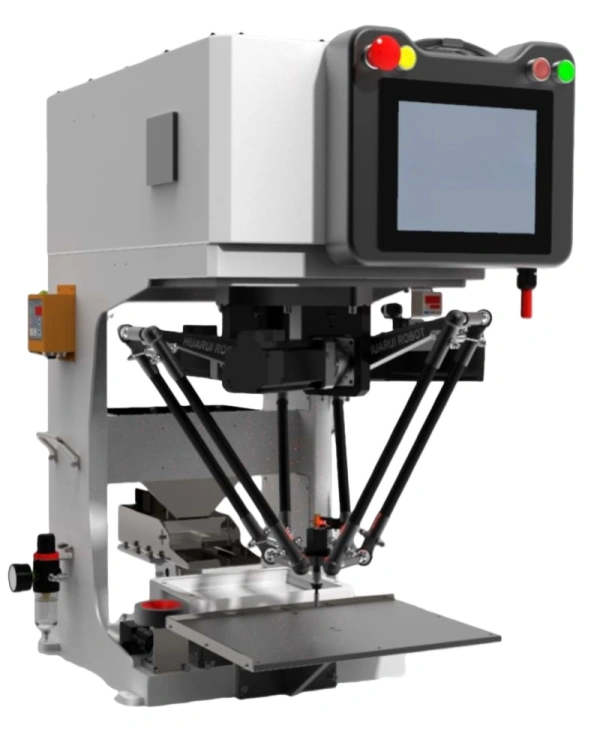
A parallel robot (delta robot) is very well suited for handling multiple products, provided the products fall within its payload, size, and speed capabilities. Its flexibility comes from the following features:
I. Why Parallel Robots Are Good for Multi-Product Handling
| Funkce | Benefit for Multiple Products |
|---|---|
| Vision guidance | Can recognize different part shapes, colors, or positions without mechanical changeover. |
| Programmable motion | Pick-and-place positions, trajectories, and speeds can be changed via software. |
| Tool changers / interchangeable grippers | Allows the robot to handle different part geometries or pick methods (suction, gripping, magnetic). |
| Quick changeover recipes | Most modern delta robots store multiple product recipes; changeover is a few button presses or a barcode scan. |
II. What Limits Multi-Product Use?
| Limitation | Explanation |
|---|---|
| Payload range | All products must be within the robot’s maximum payload (e.g., 1 kg for light-duty models, up to 5–10 kg for heavy-duty models). |
| Part size vs. workspace | The robot’s working envelope (dome shape, typically 400–1500 mm diameter) must accommodate the products and their pick/place locations. |
| Gripper design | If parts vary greatly in shape, a universal gripper (vacuum, soft gripper) or an automatic tool changer is needed. |
| Part presentation | Parts must be presented consistently (e.g., on a conveyor, in a tray, or by a feeder). If the presentation method changes, the cell design may need adjustment. |
| Pick position repeatability | For parts supplied without orientation (e.g., bulk), a vision system is required to locate the part; otherwise, the product family must have similar pick points. |
III. Typical Multi-Product Applications
| Industry | Example Products | How Parallel Robot Handles Multiple Items |
|---|---|---|
| Food | Cookies, chocolates, pastries, biscuits of different shapes/sizes | Vision identifies type; robot picks from a mixed conveyor; recipes change by product code. |
| Pharmaceutical | Vials, syringes, blister packs, bottles | Tray or conveyor presents items; robot picks based on vision or fixed spacing. |
| Elektronika | Small connectors, switches, sensors, chips | Parts may be in trays or taped; robot uses different suction tools or end‑effectors. |
| Consumer goods | Lipsticks, caps, bottles, tubes | Changeover by swapping end‑effectors and updating pick coordinates. |
| Obal | Different boxes, pouches, bags, or lids on the same line | Vision guides the robot to the product; gripper adapts to size (e.g., adjustable jaws). |
IV. Best Practice for Multi-Product Use
To make a parallel robot work effectively with many products:
Use a vision system – This is the most powerful enabler. The camera can identify product type, orientation, and position, then guide the robot accordingly.
Design a flexible end‑effector – Options:
Vacuum cup with flow control (adjusts to different surfaces)
Soft‑jaw gripper (adapts to shape)
Automatic tool changer (swap grippers between product runs)
Store product recipes in the robot controller – Include pick position, place position, speed, acceleration, and gripper settings for each product.
Standardize presentation – Use a conveyor, tray, or feeder that can accommodate all products without major mechanical change.
Train changeover procedure – Even with recipes, check that tooling (e.g., finger pads) and part alignment are correct before running.
V. Summary Table
| Question | Answer |
|---|---|
| Can a parallel robot handle multiple products? | ✅ Yes, especially with vision guidance and flexible tooling. |
| Is it as fast for all products? | ⚠️ Speed may need to be reduced for larger or heavier items, but still very fast compared to other robot types. |
| What is the key enabler? | Vision system – identifies product type, orientation, and position. |
| What about completely different product families? | ✅ Possible, but tooling (gripper) and part presentation may need to be redesigned. |

 Czech
Czech  English
  Spanish (Mexico)
  Arabic
  Russian
  German
  French
  Turkish
  Italian
  Ukrainian
  Polish
  Romanian
  Bengali
  Portuguese (Portugal)
  Thai
Thai  Japanese
  Korean
  Hebrew
  Uzbek
Uzbek  Hindi
Hindi  Slovak
  Vietnamese
  Portuguese (Brazil)
  Spanish (Peru)
  Spanish (Spain)
  Spanish (Venezuela)